Linking Rules & Flows to Contexts
Once your Context(s) are ready, you're ready to create rules & flows that are "bound" to them, priming them to automatically run when your live contexts start receiving data.
Once bound, the rule reads its inputs from context facts and writes its outputs back. No API calls required on your end. All flows that start from that rule are also considered bound and will fire automatically upon associated context updates.
Flow write-back into contexts is accomplished slightly more explicitly via a "Context Operations" step you can find easily from the flow editor.
Create a Bound Rule
Open the Rule
Click the "Create rule" button in the dashboard and open the From Context tab, which only appears when you have Contexts available.
Provide a name and description for your rule, then click Continue.
Select Context Facts
You will be presented with an interface to select facts from your associated Context as inputs and outputs to this particular rule. If your rule requires data or outputs data you cannot find, update the associated Context by adding the missing fact(s) and return here.
Fields you select as inputs cannot also be selected as outputs. Certain fields may not be eligible for selection as inputs.
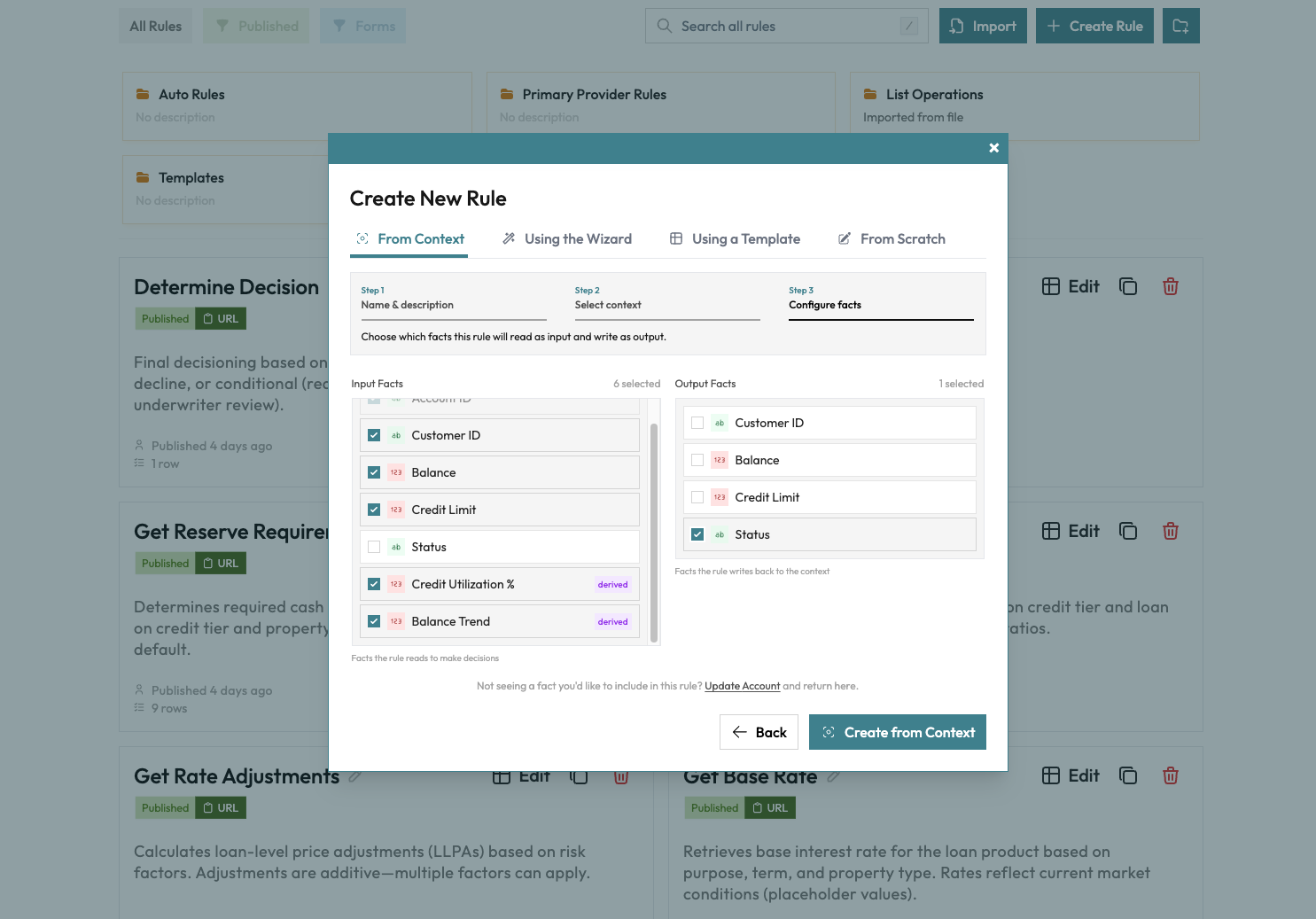
As indicated, the rule's request schema fields will map to context facts with matching names, and the rule's response fields will write to context facts with matching names.
Create Rule
Click the Create from Context button at the bottom of your modal, customize your rule, and publish it when you're ready.
To bind flows, simply create a new flow that uses a bound rule as its origin/first rule.
You can bind multiple decision assets to the same context. They'll execute in
dependency order: a rule that reads risk_tier waits for the rule that writes
it.
Cascading Rules
When Rule A writes a fact that Rule B needs, B executes automatically after A:
Facts arrive: credit_score, annual_income
       ↓
[Credit Check Rule] executes → writes: risk_tier
       ↓
[Pricing Rule] now has all inputs → executes → writes: rate, max_amount
This happens within a single API response. With ?include=execution_results,state,cascaded, the cascaded array shows what ran, and each rule's outputs are also merged into the response's state:
{
  "cascaded": [
    {
      "context": "loan-application:APP-12345",
      "rule": "credit-check",
      "status": "solved",
      "result": { "risk_tier": "low" },
      "auto_executed": true,
      "written_to_context": ["risk_tier"]
    },
    {
      "context": "loan-application:APP-12345",
      "rule": "pricing",
      "status": "solved",
      "result": { "rate": 4.5, "max_amount": 500000 },
      "auto_executed": true,
      "written_to_context": ["rate", "max_amount"]
    }
  ]
}
Bound flows that auto-execute appear in the same array with a flow key instead of rule. Flow results are not written back to instance state automatically; use a Context Operations step inside the flow for write-back.
Viewing Bound Rules
From the Context dashboard, the Assets tab shows all currently bound rules & flows, their execution modes, and which facts they read/write.
Targeting a Version or Environment
By default, a bound rule or flow executes its latest published version. A new publish takes effect on the next context submission, including an identical retry. Publishing alone does not replay stored instances, and any vocabulary values it references resolve live at execution time.
The Target column in the Assets tab lets you change this per binding:
- Latest follows the newest publish. Vocabulary values resolve live.
- A specific version executes that exact published snapshot, including the vocabulary values frozen when that version was published. The binding keeps executing identically until you change the target, even as newer versions publish or values change.
- A release environment resolves to whatever version is currently released in that environment, at execution time. Promoting a release moves every binding targeting that environment immediately, with no per-binding edits.
Readiness checks follow the target: whether a bound rule's inputs are satisfied is evaluated against the targeted version's request schema, not the latest one.
If a binding targets an environment with no live release for that asset, its
executions fail with a clear error (visible in the cascaded results) rather
than silently falling back to latest. Other bindings on the same context are
unaffected.