Notifications and Collaboration
A release workflow is only as effective as the team's awareness of it. The best-designed approval process fails if approvers do not know releases are waiting for their attention, or if stakeholders learn about deployments only after something goes wrong. Rulebricks addresses this through configurable notifications that keep your team informed at the moments that matter, without overwhelming them with noise.
Configuring Notifications for Each Environment
Notification settings are configured per environment, recognizing that different deployment stages warrant different levels of attention. A staging environment might need minimal notifications since changes there are routine, while production releases might warrant immediate alerts across multiple channels.
To configure notifications, open the Release Environments modal and locate the notifications column. Each environment shows a bell icon that indicates whether notifications are enabled. Clicking this icon opens the notification configuration for that specific environment.
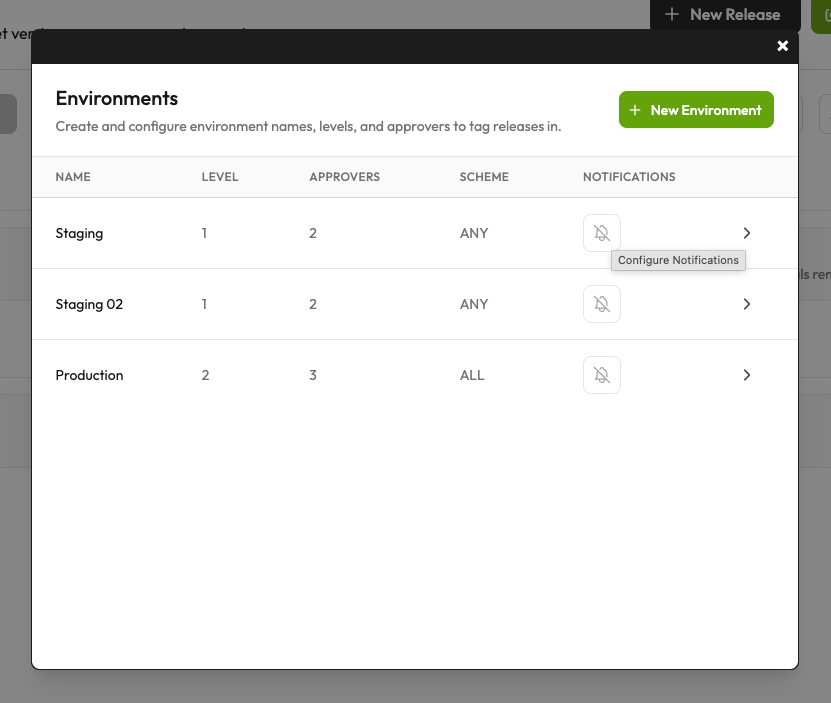
The notifications button appears alongside other environment properties, making it easy to audit which environments have alerting configured and which do not. This visibility helps ensure that your production environment does not accidentally go unmonitored while less critical environments have elaborate notification setups.
Choosing What to Notify On
The notification settings screen presents two dimensions of configuration: which events trigger notifications, and which channels receive them. The events tab lets you toggle notifications for each type of release activity, giving you fine-grained control over what your team hears about.
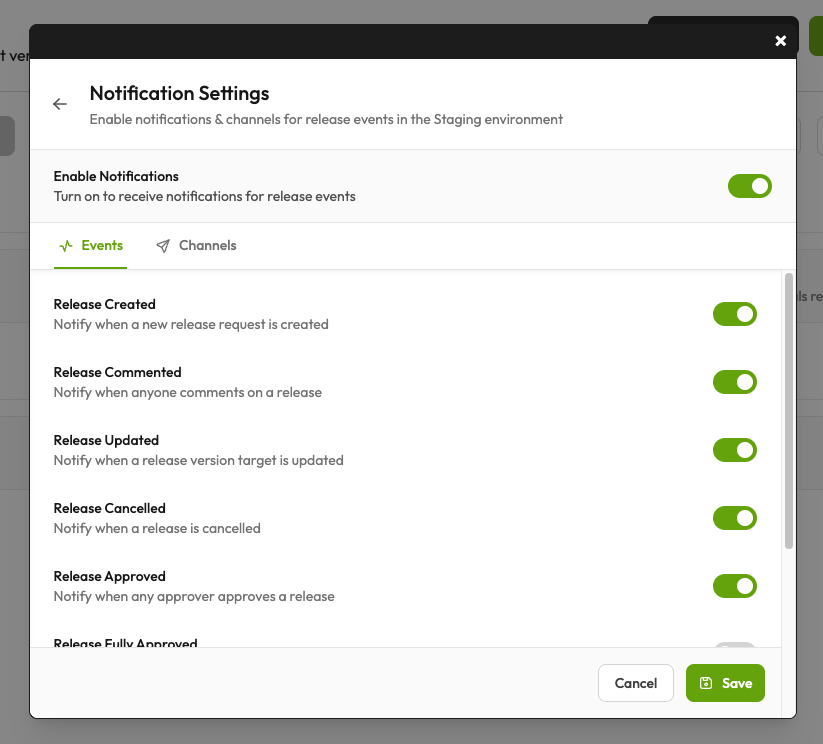
The available events cover the complete release lifecycle:
| Event | Description |
|---|---|
| Release Created | Fires when someone opens a new release request, alerting approvers that their attention is needed |
| Release Commented | Notifies when discussion happens on a release, keeping everyone aware of the conversation |
| Release Updated | Triggers when someone changes the version target of an existing release |
| Release Cancelled | Notifies when a release is cancelled |
| Release Approved | Notifies when an approver gives their approval |
| Release Fully Approved | Fires when a release meets all approval requirements and goes live, the moment when API traffic begins serving the new version |
The "Release Fully Approved" event is distinct from individual approvals. In an "all approvers required" environment, individual approvals might not be significant on their own, but the final approval that tips the release into active status is worth calling out.
The direct mentions setting deserves special attention. When enabled, team members who are mentioned in release comments receive email notifications about that specific mention. This creates a lightweight way to pull someone into a discussion without adding them as a formal approver or sending notifications about every release event.
Notification Channels
The channels tab determines how notifications reach your team. Rulebricks supports multiple delivery mechanisms, and you can enable any combination that fits your workflow.
Email notifications go directly to specified addresses. You can add individual recipients or quickly add all environment approvers with a single click. Email works well for ensuring notifications reach people even when they are not monitoring real-time communication tools.
Slack and Discord integrations allow notifications to flow into your team's existing communication channels. By providing a webhook URL for your Slack or Discord workspace, release events can post messages directly to a dedicated channel. This keeps release activity visible alongside other team discussions and makes it easy to react quickly without context-switching to the Rulebricks interface.
Custom webhooks provide maximum flexibility for teams with existing notification infrastructure or specialized requirements. Any URL that can receive a POST request with release event data can be configured as a notification destination, enabling integration with paging systems, custom dashboards, or internal tools.
The power of channel configuration lies in combination. A production environment might send emails to the on-call engineer, post to a dedicated Slack channel for visibility, and trigger a webhook that logs the event to your observability platform. The same release event can fan out to multiple destinations, ensuring that the right people get informed through the channels they actually monitor.