Rule Warnings
Rulebricks analyzes your decision tables and warns you about structural issues: rows that can never be reached, conditions that shadow later rows, gaps where inputs might fall through.
Warning detection is fairly powerful and can identify situations where conditions are structured in ways that overlap in strange and ambiguous ways, encouraging rule developers to write clearer rules.
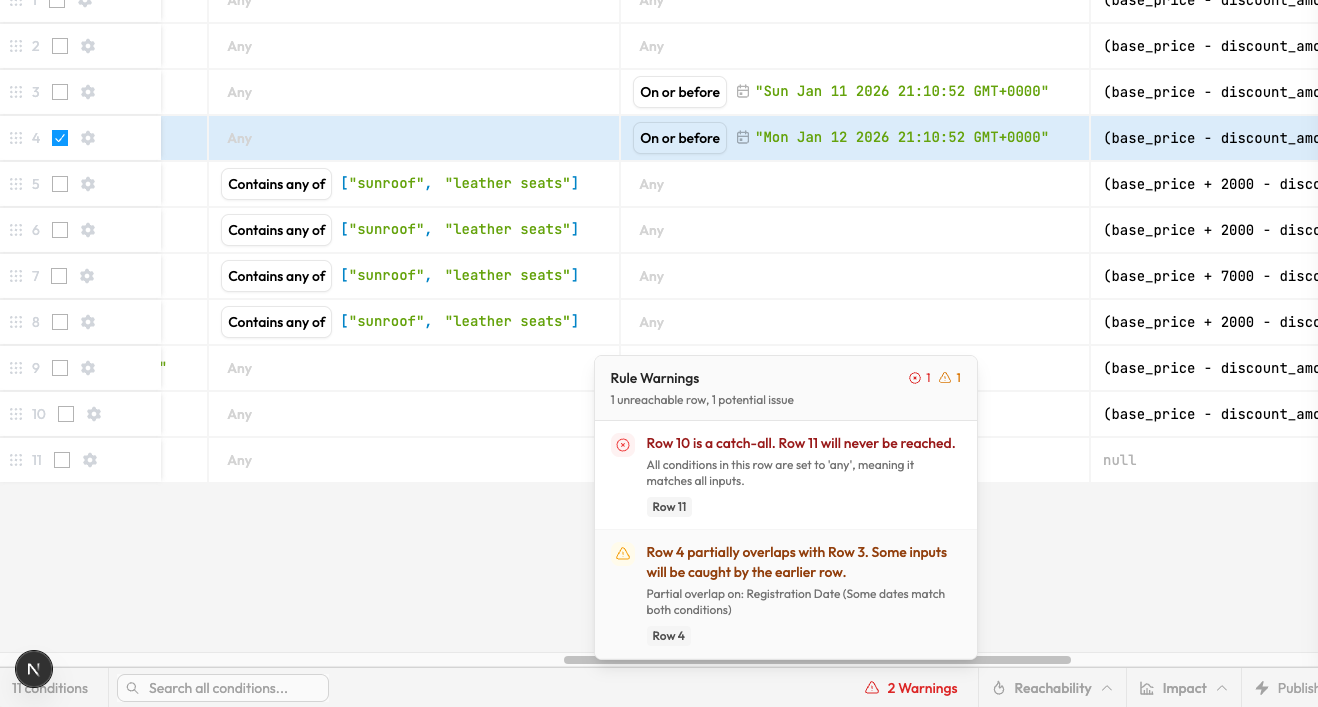
Warnings appear in the rule editor footer. Click to see details and jump to the affected rows.
Warnings use static analysis. They examine your rule structure without needing production data. For runtime analysis based on actual traffic, use Analysis Tools.
Severity Levels
Error (Red). Definite problems that will cause incorrect behavior. Unreachable rows, catch-alls blocking everything below them. Fix these before publishing.
Warning (Yellow). Likely issues that deserve attention. Partial overlaps, coverage gaps, unhandled boundary values. Review to ensure the behavior is intentional.
Info (Blue). Informational notices. Missing catch-all row, incomplete coverage suggestions. Consider whether these apply to your use case.
Common Issues
Catch-All Blocking: A row with "any" for all conditions matches everything, blocking all rows below it. Move catch-alls to the bottom.
Unreachable Rows: Every input that would match a row is already caught by an earlier row. Reorder so more specific conditions come first.
Coverage Gaps: A range of values won't match any row. Add handling for the missing range, or verify your catch-all covers it.
See Warning Types for detailed explanations and fixes for each warning.