Release URLs and API Access
The practical integration of releases into your applications comes down to URLs. When you call a rule or flow via the Rulebricks API, the URL you use determines which version of the logic gets executed. Understanding the distinction between preview URLs and release URLs is essential for building robust applications that take full advantage of the release system.
Two Ways to Access Your Rules
Every rule and flow in Rulebricks can be accessed through the API using two different URL patterns. The first pattern uses a version number at the end of the URL, directly targeting a specific published version. The second pattern uses an environment slug, which dynamically resolves to whatever version is currently released in that environment.
When you view a pending release, both URL patterns are displayed together, making the distinction clear.
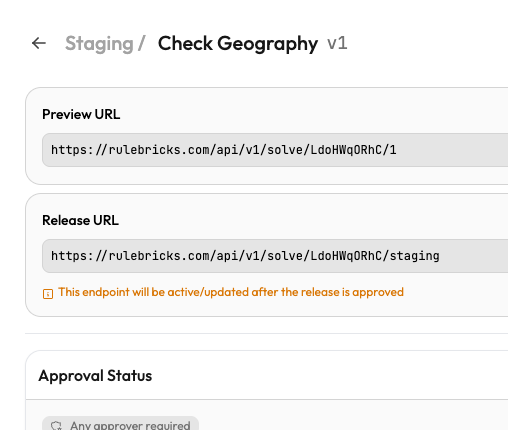
The Preview URL follows the pattern /api/v1/solve/{rule-slug}/{version-number}. This URL always returns results from the exact version you specify, regardless of what has been released. It provides a stable, predictable endpoint that never changes behavior unless you explicitly change the version number in the URL. Use this URL for testing specific versions or when you need guaranteed consistency.
The Release URL follows the pattern /api/v1/solve/{rule-slug}/{environment-slug}. This URL resolves to whatever version is currently active in the specified environment. When you approve a new release, the Release URL automatically starts serving the newly released version without any changes to your application code. This dynamic resolution is what makes releases powerful. Your production systems can point to the release URL, and deployments happen by approving releases rather than updating configurations.
Before and After Approval
The relationship between these URLs and the approval workflow is where releases provide their real value. Before a release is approved, the Release URL still points to the previous released version, or returns an error if nothing has ever been released to that environment. The pending release exists in a preparatory state, visible in the Rulebricks interface but not yet affecting API traffic.
Notice the amber warning message beneath the Release URL in a pending release: "This endpoint will be active/updated after the release is approved." This indicator makes clear that creating a release does not immediately change what your API consumers receive.
Once the release is approved, the situation changes. The Release URL now resolves to the newly approved version, and the status indicator turns green.
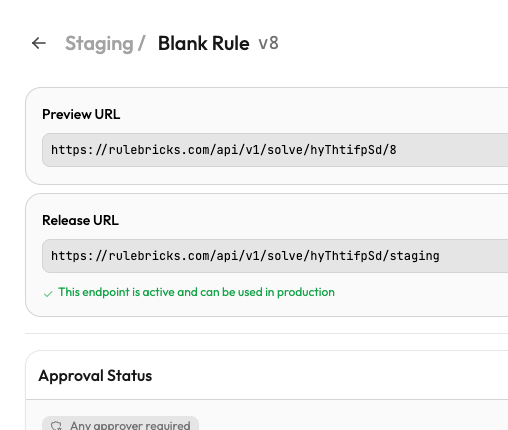
The green confirmation message, "This endpoint is active and can be used in production," signals that this version is now live. Any API call to the Release URL will execute this version of the rule. The transition from pending to released happens atomically in the database when the final required approval is given, ensuring there is no ambiguous intermediate state. Serving infrastructure is notified immediately; in the worst case (for example, if that notification is lost), each server re-checks its cached release target within about 20 seconds, which bounds how long an old version can continue to serve after a cutover.
Release targets are durable: the environment-to-version mapping lives in the database, not just in caches, so Release URLs keep resolving correctly across cache flushes, restarts, and infrastructure migrations.
Practical Integration Patterns
Though quite simple, understanding these URL patterns genuinely enables several familiar integration strategies:
Production systems with controlled updates: Configure your application to use the Release URL. Your code always calls the same endpoint, and updates happen through the approval workflow rather than code deployments. This separation means you can update business logic without touching your application infrastructure.
Staging and testing environments: Use the Preview URL to pin to a specific version while you validate behavior. This ensures your tests run against known logic even if someone approves a new release while your test suite is executing.
Multi-environment applications: Some teams use different Release URLs for different parts of their application. A customer-facing pricing service might call the production Release URL, while an internal analytics pipeline calls the staging Release URL. Both are calling the same rule, but they receive different versions based on what has been released to each environment.
Emergency rollback: The version-specific Preview URL also serves as a safety mechanism. If something goes wrong with a newly released version, you can temporarily point critical systems to the Preview URL of the previous version while you investigate. This provides an immediate escape hatch that does not require rushing through a new release approval.
Whichever pattern you choose, the key insight is that Rulebricks gives you control over the relationship between your API calls and the particular logic/version of decision assets that get executed. Releases are merely a mechanism for managing that relationship in a deliberate, auditable way.