Facts and Schema
A Context's schema defines what data it collects. There are three kinds of facts: base facts (the raw data you submit), derived facts (computed automatically), and one special identity fact (what uniquely identifies each instance).
Base Facts
Base facts are the data points you collect: things like credit_score, annual_income, or employment_verified. They come from API integrations, user input, third-party systems, or anywhere else in your application.
Each fact has a type (string, number, boolean, date, list, or object) and can be marked as:
- Required: Counts toward the context's overall
completestatus; each rule still runs as soon as its own inputs are present - Output only: Can only be written by rules, not submitted externally
- Track history: Stores previous values for temporal queries
Every write is checked against the declared fact type. Facts with Values
only enabled must also match a live value in their configured vocabulary
collection. on_schema_mismatch controls only undeclared facts: ignore drops
them, reject rejects that item, and store keeps them. It does not disable
type, output-only, or vocabulary validation for declared facts.
The Identity Fact
One fact must be the identity fact, the unique identifier for each context instance. For a loan application context, this might be application_id. For transaction processing, transaction_id.
The identity appears in your API URLs:
POST /api/v1/contexts/loan-application/APP-12345
↑ identity valueIdentity facts must be strings or numbers, must be required, and can't be output-only. Once set, they shouldn't change.
Derived Facts
Derived facts compute automatically from other facts using expressions:
// Debt-to-income ratio
monthly_debt / (annual_income / 12)

// Risk category based on score
ifelse(
  credit_score >= 750,
  'low',
  ifelse(credit_score >= 650, 'medium', 'high')
)

// Aggregate from the configured "transactions" relationship
sum($transactions, 'total')

// The equivalent namespaced relationship form is also supported
sum($relations.transactions, 'total')
They update whenever their dependencies change. No manual recalculation needed.
Expressions use synchronous JavaScript syntax in an isolated, allowlisted
sandbox. Available helpers are sum, avg, min, max, count, first,
last, stddev, within, since, coalesce, ifelse, round, ceil,
floor, abs, now, daysAgo, hoursAgo, historySum, historyAvg,
historyLast, and historyTrend. Network APIs, process globals, randomness,
timers, constructors, and asynchronous results are not available. An expression
that fails or exceeds its execution limit resolves to that derived fact's
configured default.
Use Test Expression to preview a derived fact against a live instance. The preview uses your unsaved schema, evaluates dependent derived facts in order, and loads the instance's recorded history and live related data. It does not save your schema, update the instance, or execute bound rules or flows. Errors show the configured runtime default; missing related data is shown as pending, including for facts that depend on another pending derived fact. A successfully loaded, empty collection is available data, so its sum and count are zero.
Relationships
Contexts can relate to each other. A customer context can have many transaction contexts. A transaction context can belong to a customer. These relationships let you build decisions that span multiple entities.
The Pattern
Customer (one) → Transactions (many)
A customer context tracks lifetime data: total spend, transaction count, loyalty tier. Each transaction context tracks a single transaction. When an transaction completes, you might want to update the customer's lifetime stats.
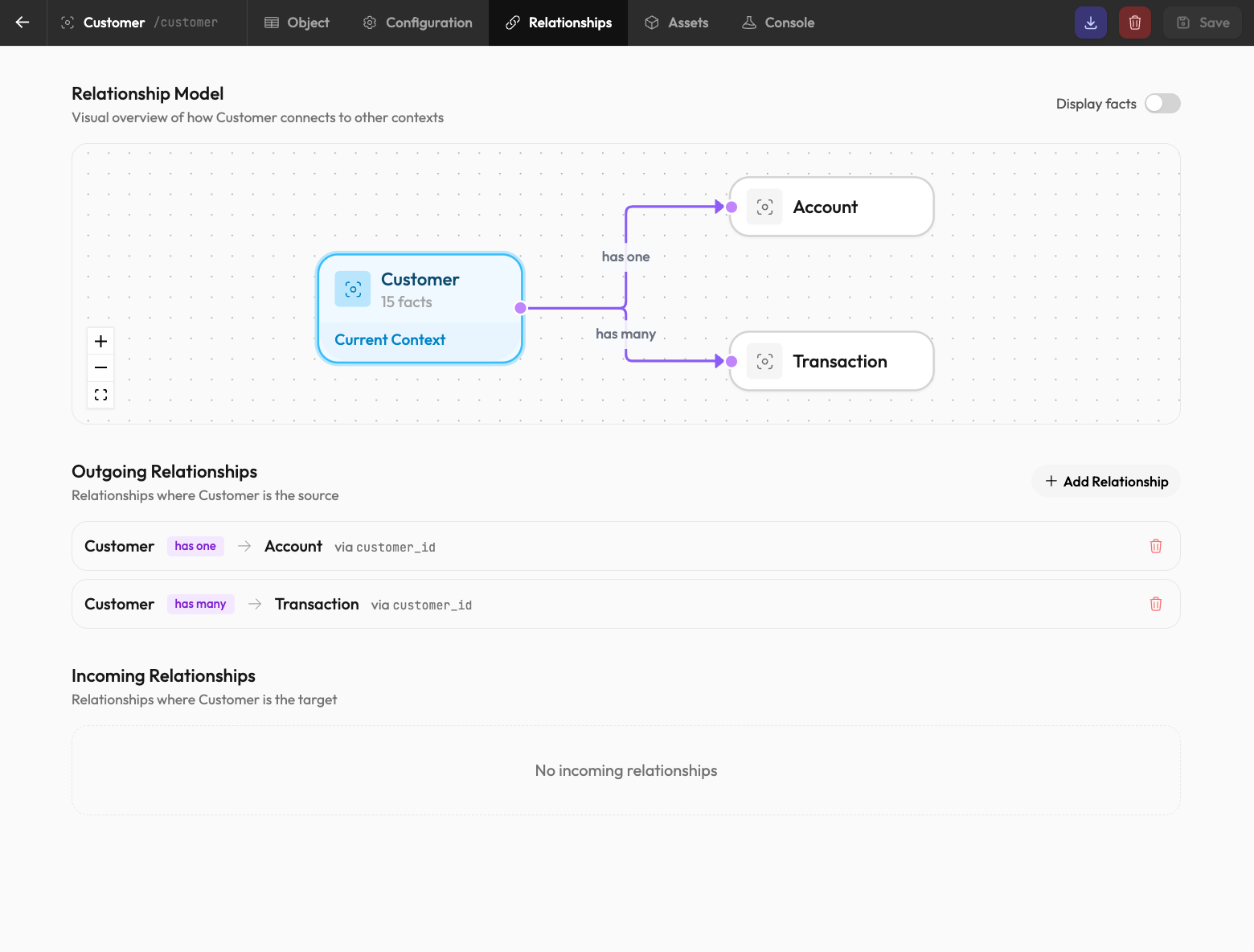
Defining Relationships
In the Context Editor, add a relationship field:
On the Customer context:
transactions: has_many(Transaction, 'customer_id')On the Transaction context:
customer_id: string (foreign key)Now transactions link to their customer, and customers can reference their transactions. In expressions, use $<relationship-name>. For this example, $transactions on Customer and $customer on Transaction. An unnamed relationship uses the target context slug.
Using Relationships
Derived facts are required for you to expose and use data from related Contexts.
For example, on a Customer context, I might use:
// Total spend across all transactions
total_spend: sum($transactions, 'total')

// Number of completed transactions
transaction_count: count($transactions.filter((item) => item.status === 'complete'))

// Most recent transaction date
last_transaction_date: max($transactions, 'created_at')
These recalculate automatically when any related transaction changes.
Cascading Across Relationships
When an transaction is marked complete, it can trigger rules on the customer context:
- Transaction context receives
status: "complete" - Customer's
transaction_countderived fact recalculates - If
transaction_countcrosses a threshold, a loyalty tier rule executes - Customer's
loyalty_tierfact updates
This cascade happens automatically based on the relationships and rule bindings you've defined.
Relationship queries ($transactions in this example) only include live, non-expired
context instances. Expired transactions won't appear in aggregations. If this
is an issue, consider maintaining a running statistic in your systems and
sending it into the Context via a base fact. We still consider this a data
concern rather than a Rulebricks problem.
Navigating the Other Direction
From an transaction, access the parent customer:
// Get customer's tier for transaction-level pricing
customer_tier: $customer.loyalty_tier
This creates a dependency: the transaction context waits for the customer's loyalty_tier before derived facts using it can calculate.
Solvability
A context instance is "solvable" when all required facts are present. The API always tells you where you stand:
{
  "status": "pending",
  "have": ["application_id", "credit_score"],
  "need": ["annual_income", "employment_verified"]
}
When need is empty, status becomes complete. Rule and flow readiness is asset-specific: a bound asset can execute while the context is still pending if all inputs for that asset are already present.
Fact History
Enable Track history on facts whose prior values matter. Contexts append a history entry only when a tracked value changes and retain up to the context's configured history_limit entries per fact.
Removing a tracked fact or disabling its history tracking removes its retained history on that instance's next update. Reducing history_limit trims existing history on the next update as well. History is stored separately from the instance's 64 MiB state-and-execution-metadata allowance.
Tracking is not retroactive: values written before Track history was enabled do not appear later. History is ordered newest first with a deterministic tie-breaker, including when several changes to the same identity arrive in one batch.
Read history with:
GET /api/v1/contexts/{context-slug}/{identity}/history
GET /api/v1/contexts/{context-slug}/{identity}/history?field=credit_limit&limit=10
The response groups entries by fact, newest first:
{
  "context": "customer:c_001",
  "history": {
    "credit_limit": [
      { "timestamp": "2026-07-28T15:00:00.000Z", "value": 500 },
      { "timestamp": "2026-07-28T14:00:00.000Z", "value": 300 }
    ]
  }
}
The history endpoint defaults to 50 entries per fact. limit must be an integer from 1 to 10,000; invalid values return HTTP 400. A requested field must have history tracking enabled.
Derived expressions can read the raw entries through $history or use the
history helpers:
historySum('credit_limit')       // finite numeric values; 0 when empty
historyAvg('credit_limit')       // finite numeric values; null when empty
historyLast('credit_limit')      // newest value, or null
historyLast('credit_limit', 3)   // up to three newest values
historyTrend('credit_limit')     // 1 increasing, -1 decreasing, 0 flat/insufficient
Fact paths are string arguments, so nested facts use
historySum('account.credit_limit').